Why does my Samsung 8K TV resolution drop with external devices?
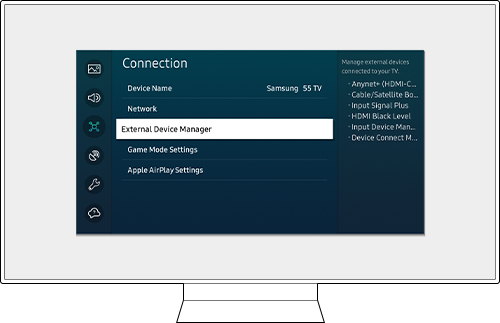
Why does my Samsung 8K TV show lower resolution when connected to external devices?
If your Samsung 8K TV displays a lower resolution than expected when connected to external devices like gaming consoles, streaming boxes, or PCs, the issue is often related to HDMI settings, cable quality, or device compatibility. Follow these steps to restore full 8K resolution.
1. Why does the resolution drop when connecting external devices?
The resolution may drop due to several factors, including:
- Incorrect HDMI settings on the TV.
- Using a non-certified HDMI cable.
- The external device does not support 8K resolution.
- The Input Signal Plus feature is disabled or incompatible.
2. How to enable Input Signal Plus for 8K resolution
Input Signal Plus enhances HDMI signal processing and supports higher resolutions. Here's how to enable it:
- Press the Home button on your Samsung TV remote.
- Select Settings (gear icon).
- Go to All Settings > Connection > External Device Manager > Input Signal Plus.
- Select the HDMI port connected to your external device.
- Set Input Signal Plus to On.
Note: If Input Signal Plus is set to On, your TV supports resolutions up to 7680 x 4320p (8K). If set to Off, the maximum resolution is limited to 3840 x 2160p (4K).
3. What resolution and frame rate options are available?
When Input Signal Plus is enabled, the following resolutions and frame rates are supported:
Resolution: 7680 x 4320p (8K)
| Frame Rate (fps) | Color Depth / Chroma Sampling | RGB 4:4:4 | YCbCr 4:4:4 | YCbCr 4:2:2 | YCbCr 4:2:0 |
|---|---|---|---|---|---|
| 24/30/50/60 | 8 bit | 0 | 0 | 0 | 0 |
| 24/30/50/60 | 10 bit | 0 | 0 | 0 | 0 |
Resolution: 3840 x 2160p / 4096 x 2160p (4K)
| Frame Rate (fps) | Color Depth / Chroma Sampling | RGB 4:4:4 | YCbCr 4:4:4 | YCbCr 4:2:2 | YCbCr 4:2:0 |
|---|---|---|---|---|---|
| 50 / 60 | 8 bit | - | - | - | - |
| 50 / 60 | 10 bit | - | - | - | - |
Note: If your external device supports only UHD 24Hz, UHD 30Hz, or HD frequencies, Input Signal Plus may not be available. In such cases, disable the feature.
4. Additional things to check
To ensure optimal performance, verify the following:
- Use a certified HDMI 2.1 cable for 8K resolution.
- Ensure your external device supports 8K resolution.
- Update the firmware of your Samsung TV and external device.
- Avoid using the same HDMI port for multiple devices simultaneously.
5. Supported Samsung 8K TV models
Input Signal Plus and 8K resolution support are available on select Samsung TV models, including:
- QN900C, QN800C, QN90C (2023 models)
- QN950B, QN900B, QN90B (2022 models)
- QN900A, QN90A (2021 models)
For compatibility details, refer to your TV's user manual.
6. Related Samsung support topics
Thank you for your feedback!
Please answer all questions.