How to use the Samsung Smart Remote with The Freestyle
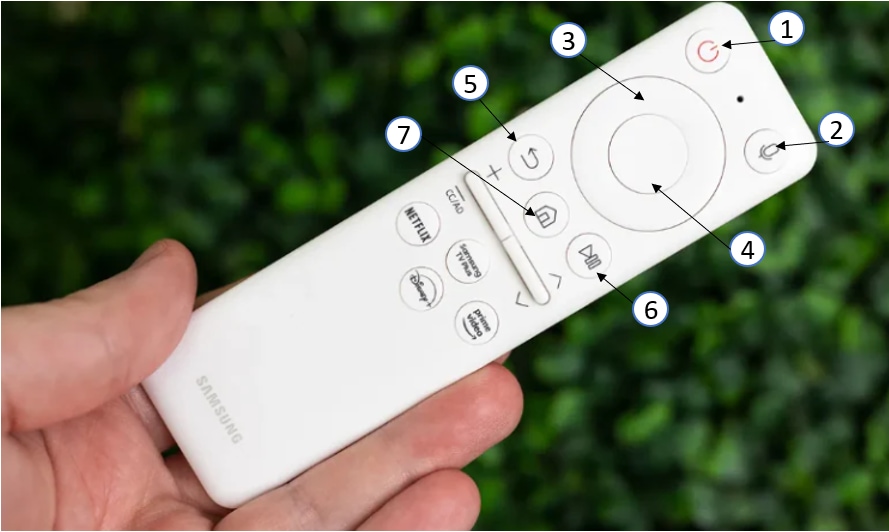
The Samsung Smart Remote for the Freestyle projector offers intuitive controls for managing your device. Learn how to use its features effectively and troubleshoot common issues like unresponsive controls or pairing problems.
1. How to Use the Samsung Smart Remote with Your Freestyle Projector
The Samsung Smart Remote simplifies controlling your Freestyle projector. Follow these steps to use its features:
- (Power) Press to turn the projector on or off.
- (Voice Assistant) Hold the button, speak a command, and release to activate Voice Assistant. Ensure the remote is at least 0.6 inches (15.24 mm) from your face when using the microphone.
- Directional Buttons (Up, Down, Left, Right) Navigate menus or highlight items on the home screen.
- (Select) Choose or run a highlighted item.
- (Return) Go back to the previous menu.
- (Smart Hub) + (Control PAD) Return to the home screen. Hold for 1 second to access the Control PAD for settings, numeric input, or color options.
- (Play/Pause) Control media playback.
2. Why Is My Samsung Smart Remote Not Working?
If the remote isn't responding, follow these troubleshooting steps:
- Check if the projector's remote sensor blinks when pressing the Power button.
- Point the remote directly at the projector from 5–6 feet (1.5–1.8 meters) away.
- Ensure the remote is paired with the projector.
- If the battery is low, charge it using the USB-C port on the remote.
3. Additional Things to Check
For persistent issues, consider these factors:
- Verify the projector's firmware is up to date.
- Restart both the projector and remote to reset connectivity.
- Ensure no physical obstructions block the remote's signal.
4. Supported Samsung Freestyle Projector Models
The Smart Remote is compatible with select Samsung Freestyle projector models. Refer to your user manual for specific compatibility details.
5. Related Samsung Support Topics
Thank you for your feedback!
Please answer all questions.